> ## Documentation Index
> Fetch the complete documentation index at: https://docs.snagsolutions.io/llms.txt
> Use this file to discover all available pages before exploring further.
# Send Telegram Messages
> Telegram messages loyalty rule. Reward users for engaging in Telegram conversations.
## Overview
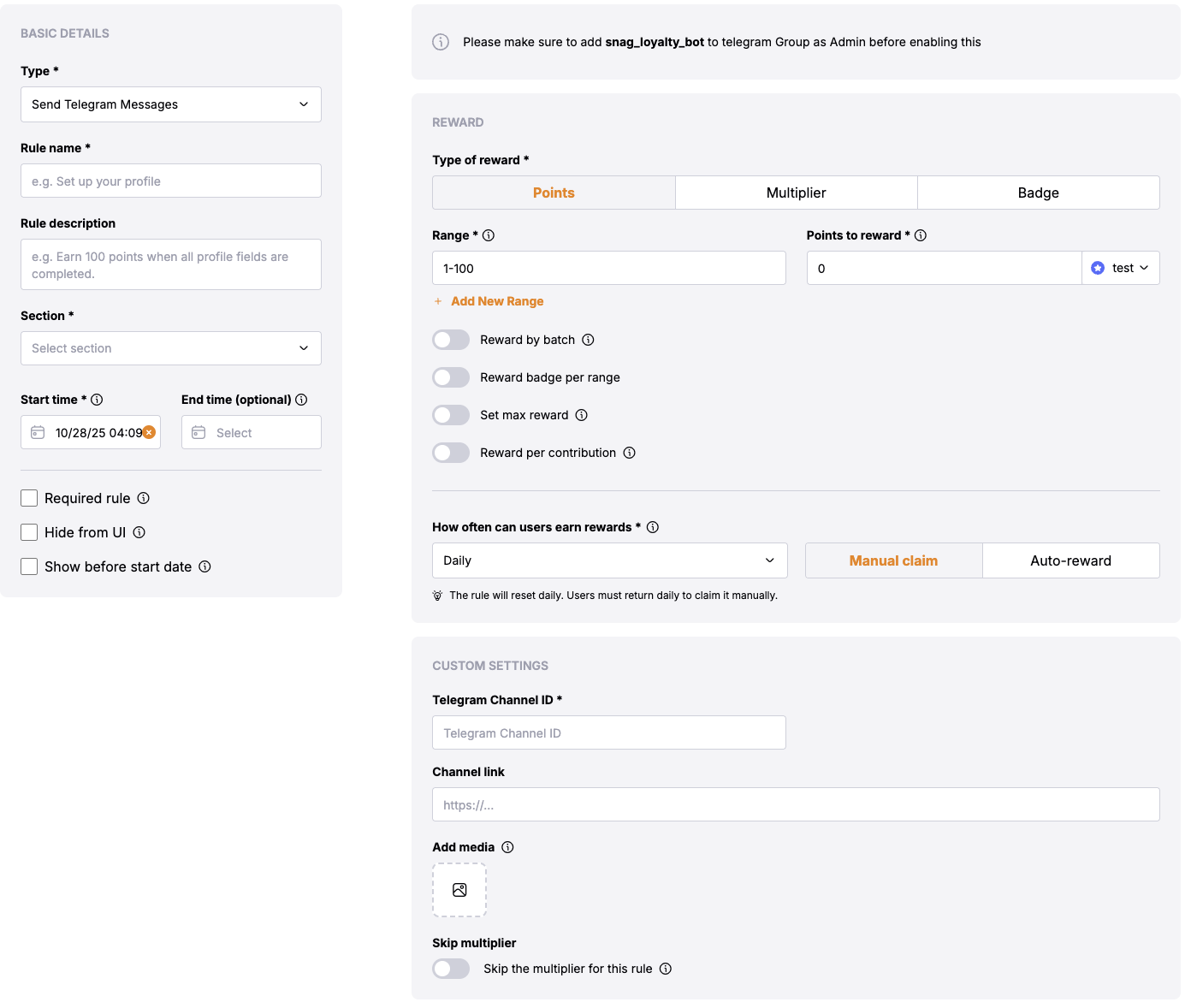
This loyalty rule allows admins to reward users for sending messages in their [Telegram](https://telegram.org/) group. This rule is useful for encouraging users to be more engaged in the Telegram group.
## Prerequisites
* Snag [Telegram loyalty bot](https://t.me/snag_loyalty_bot) must be added to the Telegram group with admin permissions:
* [Bot Link](https://t.me/snag_loyalty_bot)
* The user must have connected their Telegram account to Snag.
* The user must have sent messages in defined group.
## Rule Configuration Fields
### **Reward**
* **Type of Reward**: Choose between "Points" or "Multiplier".
* **Points**: Users will receive the defined number of points based on their activity or achievement.
* **Multiplier**: Users will receive the multiplier of the defined range based on their qualification level.
* **Required Range**: Define a numerical range for eligibility (tokens, actions, followers, messages count, etc.).
* **Points to Reward**: Define the number of points assigned for the specified qualification range.
* **Add New Range**: Allows defining multiple qualification ranges with corresponding rewards.
### Basic Settings
* **Update Cadence**: This defines how often the user will be rewarded and also how often the rule will check if the user has sent the defined number of messages in the Telegram channel.
### **Custom Settings**
* Skip the multiplier for this rule
* **Group link**: This will add the button on rule display page to take the user to the Telegram group.
* **Telegram Group Id**: The ID of the Telegram group where the rule will be applied.
For public group, you can use either:
* **Username**: Enter the group username (e.g., `@groupname` or `groupname`)
* **Invite link**: Use the full invite link (e.g., `https://t.me/groupname`)
For private group, you need the group ID:
Go to [https://web.telegram.org](https://web.telegram.org) and navigate to your private group.
Copy the URL from your browser's address bar. It will look like: [https://web.telegram.org/k/#-3243034605](https://web.telegram.org/k/#-3243034605)
You can use either:
* The full URL: `https://web.telegram.org/k/#-4908688673`
* Just the ID number: `-4908688673`
The ID will always be a negative number for private group. Make sure to include the minus sign when copying just the ID number.